
SERP Snippet Generator
Preview title, URL, and meta description together with desktop and mobile pixel cuts before you publish.
Free tool — no signup
Use this free canonical tag generator to build a clean absolute rel=canonical link for your preferred URL. Force HTTPS, strip tracking parameters, validate common mistakes, and copy HTML or Link headers — in your browser, no signup.
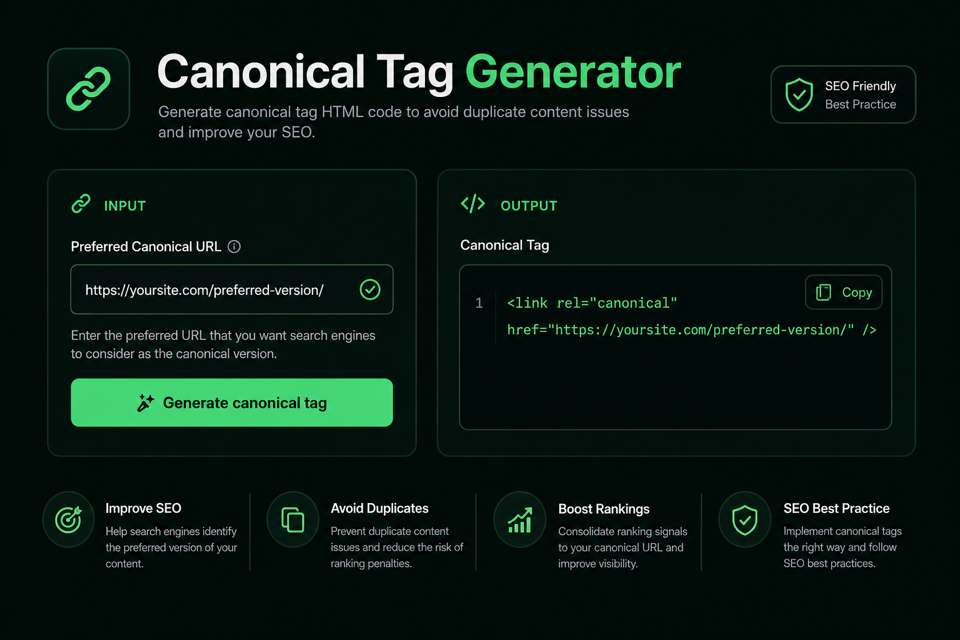
Paste the preferred URL. Normalization stays in your browser — nothing is uploaded.
Local bulk generate — no upload. Export CSV when you need a sheet.
Normalized URL, validation checks, and copy-ready tags.
Run the utility to generate output in this panel.
A canonical tag (rel="canonical") points search engines to the preferred URL when the same or very similar content is available under more than one address.
This DilDigital tool generates the HTML link element (and an optional HTTP Link header) for that preferred URL. It also cleans common URL noise so you do not accidentally canonicalize a UTM-tagged or http:// variant.
People search for this job as a rel canonical generator, canonical URL generator, or canonical link generator. The job is the same: produce clean markup quickly.
Canonical tags are a strong hint, not a hard directive. Google may still choose another URL when sitemaps, redirects, or internal links disagree. Consistency across those signals matters as much as the tag itself.
The generator runs in your browser. Draft URLs are not uploaded to DilDigital.
Canonical URLs should be absolute and usually HTTPS. Unique pages should self-reference.
Use a full URL with protocol and host, not a root-relative path like /page/. Relative canonicals are easier to misinterpret across environments.
Prefer HTTPS. If both http and https serve the same page, the canonical should name the secure version.
Self-referencing canonicals on unique pages are a recommended practice. They clarify the preferred URL even when no intentional duplicate exists, and they help when tracking parameters create extra variants.
| Rule | Do | Avoid |
|---|---|---|
| URL form | https://example.com/page | /page or //example.com/page |
| Protocol | HTTPS preferred URL | http:// canonical on an HTTPS site |
| Parameters | Only content-changing params | UTM, gclid, fbclid, session IDs |
| Placement | One tag in HTML head | Multiple conflicting canonicals |
| Consistency | Match sitemap + internal links | Canonical chains A→B→C |
Paste the preferred URL you want search engines to treat as the main version of the page. This generator normalizes common junk (HTTP, UTMs, hashes) and returns copy-ready markup.
It is built for founders, marketers, and developers who need a clean canonical tag without opening a crawl suite.
Everything runs locally in your browser. Use Bulk URLs for a short local list and export CSV when you need a sheet.
Enter the absolute URL you want indexed as the main version. Use Bulk mode for up to 50 URLs locally.
Force HTTPS, strip UTM/tracking params and hashes, lowercase the path, and set your trailing-slash policy.
Read the normalized URL, validation checks, and warnings before you copy anything.
Paste the tag into your HTML head, or use the optional Link header for non-HTML files. Keep sitemap and internal links consistent.
Pick one URL shape and keep it everywhere that matters.
Tracking parameters belong in campaign links, not in canonical URLs. Strip utm_*, gclid, fbclid, and similar noise before you generate the tag.
Trailing slash policy is a site decision. Choose force, strip, or keep — then align internal links and redirects so Google does not see mixed signals.
www vs non-www is the same story: pick one hostname and stay consistent. This tool can strip www when that is your standard.
The tag helps. It does not override a contradictory site.
If your sitemap lists URL A, internal links point to URL B, and the canonical names URL C, Google may ignore the tag. Make the preferred URL obvious everywhere.
Do not canonicalize unrelated pages together just to “merge authority.” Canonicals are for duplicates or near-duplicates of the same content.
This generator does not live-check whether the target returns HTTP 200. Confirm the preferred URL resolves cleanly before you ship.
Compare clean tags with weak ones before you ship.
<link rel="canonical" href="https://dildigital.com/tools/canonical-tag-generator">
<link rel="canonical" href="/tools/canonical-tag-generator">
Takeaway: Absolute HTTPS URLs are unambiguous. Relative paths depend on the requesting context and are easier to get wrong.
<link rel="canonical" href="https://example.com/shoes/running-shoes/">
<link rel="canonical" href="http://example.com/shoes/running-shoes?utm_source=newsletter&sort=price">
Takeaway: The good tag names a clean preferred URL. The bad tag keeps an insecure protocol and campaign/sort noise.
<link rel="canonical" href="https://example.com/blog/canonical-tags-explained/">
<link rel="canonical" href="https://example.com/">
Takeaway: Unique articles should self-reference. Pointing every post at the homepage is not a duplicate-content fix.
Use these rules when you generate markup and wire it into the site.
Include protocol and host. Prefer https:// over http://.
Each indexable page should usually canonicalize to itself.
Keep UTMs on campaign links, not on the canonical URL.
Multiple conflicting tags confuse crawlers. Keep a single clear signal.
Or send a Link HTTP header for non-HTML files such as PDFs.
The preferred URL should be the one you link to and list in the sitemap.
Point variants directly to the final preferred URL, not through intermediate hops.
Near-duplicates only. Different intents need their own URLs.
Choose one shape sitewide and stick to it.
Preferred URLs should return a normal success response, not soft-404 or redirect loops.
Cross-domain canonicals can point republished copies back to the original.
When partners republish your article, a cross-domain canonical to the original source can help search engines understand which URL should lead.
That still depends on correct implementation on the syndicated page. Coordinate with partners instead of assuming the tag alone will win.
Most failures are ordinary hygiene problems.
Relative URLs, leftover UTMs, HTTP targets on HTTPS sites, canonical chains, and pointing everything to the homepage are classic mistakes.
Another frequent error: putting the tag outside <head>, or emitting multiple canonical tags from a theme plus a plugin.
Run these checks after the generator returns a tag.
Straight answers for rel=canonical, duplicates, and Google’s hints.
A canonical tag is an HTML link element with rel="canonical" that names the preferred URL for a page when duplicates or near-duplicates exist. It helps search engines consolidate indexing signals.
A generator produces correct absolute markup quickly and can clean common mistakes such as HTTP links, UTM parameters, and hash fragments before you paste the tag into your site.
Yes for most indexable pages. Self-referencing canonicals clarify the preferred URL even when you did not intentionally create duplicates, and they help when tracking parameters invent extra variants.
Google treats canonical tags as a strong hint, not a hard directive. Align sitemaps, redirects, and internal links with the same preferred URL so the hint is easy to trust.
No. Keep tracking parameters on campaign links. Canonical URLs should name the clean preferred address. This tool can strip utm_* and similar params automatically.
Put one rel=canonical link in the HTML head. For non-HTML files, you can send a Link HTTP header instead.
Yes. Cross-domain canonicals can point syndicated or republished copies back to the original source. The syndicated page must implement the tag correctly.
A 301 redirect moves users and crawlers to another URL. A canonical tag leaves the page accessible while suggesting which URL should be preferred in search results. Use redirects when you truly want one URL; use canonicals for duplicate or parameterized variants you still need to serve.
Prefer absolute URLs with https:// and the full host. Relative canonicals are more error-prone across environments.
Conflicting tags create noise. Keep a single clear canonical signal per page — fix theme/plugin duplicates instead of stacking more tags.
Yes. The preferred URL in the canonical tag should match the URL you list in the XML sitemap and the URL you use in internal links whenever possible.
Canonicals help consolidate indexing signals for duplicate or near-duplicate URLs. They are not a magic PageRank pipe for unrelated pages. Use them for true duplicates, not as a substitute for good site architecture.
Usually no. Pagination often needs its own URLs. Follow current Google guidance for pagination and view-all patterns instead of forcing every page onto page one.
No. DilDigital’s generator stays browser-local and does not fetch your URL. Confirm the preferred URL resolves cleanly in your own browser or server logs before publishing.
You can declare a canonical URL with a Link response header, which is useful for PDFs and other non-HTML files. This tool can copy that header format for you.
Use Bulk URLs mode, paste one preferred URL per line (up to 50), generate locally, then copy all HTML tags or download CSV. Nothing is uploaded.
Pick one hostname as standard. Redirect the other when possible, and make sure canonicals name the chosen host consistently.
Paste a preferred URL, clean tracking noise, review the checks, then copy the HTML tag into your page head.