
Meta Title Length Checker
Check title tag length in characters and pixels before Google truncates your SERP title.
Free tool — no signup
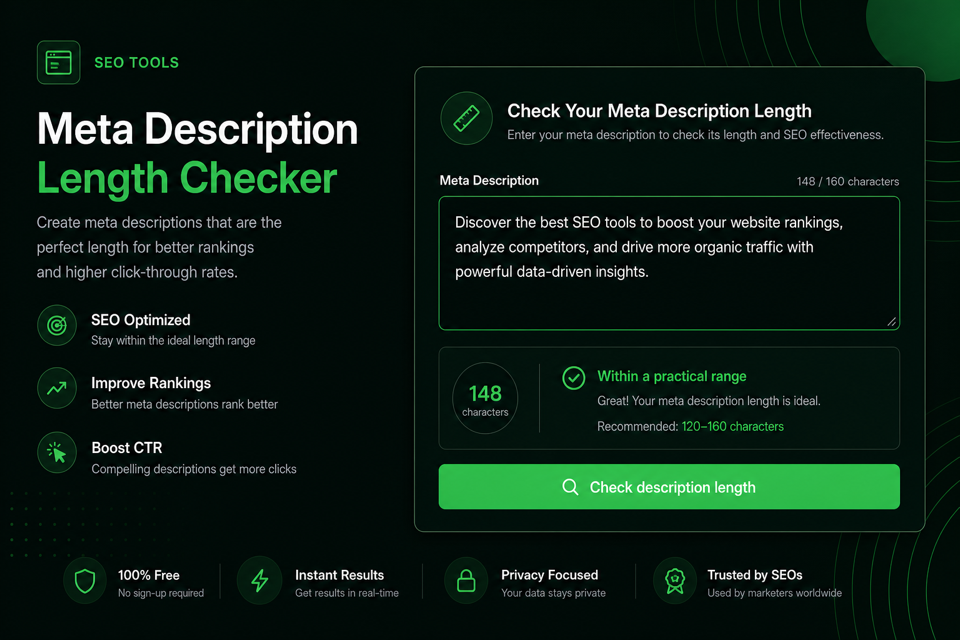
Use this free meta description length checker to test a draft before you publish. Get character count, approximate desktop and mobile pixel width, keyword-survival checks, desktop/mobile snippet previews, and a practical verdict — all in your browser, no signup.
A meta description is the HTML summary Google may use as the gray snippet under a title link in search results.
Length here means display safety in the SERP, not a Google “penalty score.” Descriptions that run too long get cut with an ellipsis. Descriptions that stay too short waste the space searchers use to decide what to click.
People also search for this job as a meta description checker, snippet length checker, or SEO meta description checker. The job is the same: validate the string before it goes live.
Google can draw the snippet from your HTML meta description or from on-page text that better matches the query. A clear, accurate, unique description still gives you the best chance of controlling the message.
This DilDigital page is for founders, bloggers, SEOs, and students who want a fast, honest check without signup friction. The tool runs locally in your browser so draft descriptions never need to leave your machine.
Character count is a useful guide. Pixel width is closer to how Google actually truncates snippets.
A classic proof still applies: WWW is not the same width as iii. Both are three characters, but wide capitals consume far more horizontal space in a SERP description. That is why two descriptions with the same character count can render differently.
Industry practice treats about 120 to 160 characters, or roughly 920 pixels on desktop and 680 pixels on mobile, as a practical safety zone. Google does not publish one permanent magic number, and layouts change, so treat those figures as working guidance rather than law.
This DilDigital tool measures approximate pixel width in the browser with an Arial 14px canvas estimate, then pairs it with character count and a practical verdict. That is the common industry method used by many free checkers. It is still an estimate, not a private Google API.
On mobile, the visible budget is shorter. Front-load the benefit and soft CTA in the first stretch so phones still see the point even if the ending disappears.
| Element | Approx chars | Approx px | Notes |
|---|---|---|---|
| Desktop snippet | 150–160 | 900–920 | Common industry safety zone for English descriptions |
| Mobile snippet | 110–130 | 650–680 | Shorter budget — protect benefit + CTA early |
| Too short zone | Under 70 | Varies | Often wastes SERP space and looks incomplete |
| Rising risk zone | 160+ | 920+ | Ellipsis risk rises; wide letters fail sooner |
| Same chars, different width | 3 vs 3 | WWW ≫ iii | Proof that character count alone can mislead |
Paste the exact meta description you plan to use. This checker counts characters, estimates pixel width, and tells you if the length sits in a practical range for search snippets.
It is built for founders, bloggers, marketers, and students who need to validate a description quickly without opening a full SEO suite.
Your draft stays in the browser. Nothing is uploaded, and you do not need an account. Use Compare A/B for two candidates, or Bulk check for a local description sheet.
Enter the exact summary you plan to put in the HTML meta description. Optionally add a target keyword, preview title, and display URL for richer checks.
Hit Check description length (or just type — single mode updates live) to see characters, desktop/mobile pixel meters, and a practical verdict.
Google truncates snippets by pixel width. Descriptions full of wide letters can cut off earlier than a narrow line with the same character count.
Use the desktop and mobile snippet previews to see where an ellipsis would fall, whether your keyword survives, and whether the CTA still shows on phones.
Compare two candidates, run a local bulk sheet, copy a QA summary for teammates, then front-load the benefit and re-check before you publish.
Write for the searcher first. Keep the checker mindset: clear benefit, natural keyword, short enough to display.
Under about 70 characters usually feels thin. Around 120 to 155 characters is a practical zone for many English pages. Past 160 characters, truncation risk rises quickly — and mobile may cut earlier by pixels even when the character count looks fine.
Put the primary topic near the front so Google can bold matching query terms in the visible portion. End with a specific benefit or soft CTA, not a vague “click here.” Keep every description unique across indexable URLs.
Google’s snippet guidance asks for accurate page summaries. Meta descriptions are not a direct ranking factor, but they strongly influence whether someone clicks.
After publish, watch Search Console CTR on important URLs. A description that ranks but earns weak clicks is often too vague, too truncated, or misaligned with the query the page actually wins.
Truncation and rewriting are different problems. Length issues cause cutoffs. Relevance and uniqueness issues cause replacements.
Truncation happens when the rendered description is wider than the space Google allocates in the result. You see an ellipsis and lose the ending words — often the CTA.
Rewriting or replacement happens when Google decides on-page text better matches the query. Common triggers include a description that does not answer the search, heavy stuffing, duplicates across many URLs, or a weak summary compared with a clearer body passage.
You cannot force a snippet. You can reduce bad outcomes by keeping length and pixels under control, matching on-page reality, writing unique copy, and putting the real benefit where mobile users still see it.
Compare clean descriptions with weak ones before you ship: good, too long, too short, and vague CTA traps.
Check meta description length in characters and pixels. See desktop and mobile truncation before you publish — free DilDigital checker, no signup.
Meta descriptions are very important for SEO and website traffic so you should read our complete guide to learn everything about writing the best possible meta descriptions for every page on your website in 2026.
Takeaway: The good description leads with the job, stays compact, and ends with a clear free offer. The bad description rambles past a practical pixel budget with no specific action.
Validate SEO meta descriptions with pixel width, keyword survival, and snippet previews. Browser-local DilDigital tool — no account required.
Meta description checker.
Takeaway: The short line wastes snippet space and says almost nothing. The stronger line still fits a practical range while naming the outcome.
Explore 15 practical marketing plays for 2026. Grow organic traffic, clarify your offer, and ship pages that earn clicks.
Click here to read our new blog post about marketing strategies because we spent a lot of time writing it for our audience.
Takeaway: The good line states value. The bad line leans on “Click here” and talks about the publisher, not the searcher.
Generate clean canonical tags for duplicate-URL control. Free DilDigital generator with copy-ready HTML output.
WWW MAXIMUM WARRANTY GUIDE FOR COMMERCIAL MOWER BUYERS LOOKING FOR THE BEST DEAL IN 2026 TODAY
Takeaway: Heavy wide capitals can render much wider in pixels even at a similar character count. Prefer mixed case and tighter wording.
Use these rules when you check description length and rewrite before publish.
Treat under 70 as too thin and over 160 as rising truncation risk. Re-check after every edit.
Use the pixel reading from this tool. Wide letters consume more SERP space than the raw character count suggests.
Front-load the benefit and soft CTA so phones still see the point if the ending is cut.
Matching terms may bold in the snippet. Place them early enough to survive the cut.
Tell searchers what they get. Avoid empty “Click here” or “Learn more” with no substance.
Every indexable URL needs its own summary. Template sameness creates confusion in search results.
If the description oversells or misses the query, Google is more likely to pull a different snippet.
Repeating the same phrase looks spammy. Write one natural summary.
A mid-sentence cut reads poorly. Prefer short sentences that still make sense if truncated.
Description length is one publish gate. Confirm the title tag and full snippet before you ship.
Search snippets are still a CTR surface. Clear page labeling helps everywhere your URL is cited.
AI systems often surface a title and short label for cited pages. Your meta description is not a secret AI ranking lever, but a clear page promise still travels better than vague boilerplate.
Write one honest summary for humans in Google. That same clarity helps when other systems need a short explanation of what the page offers.
Most weak descriptions fail for ordinary reasons, not exotic algorithm myths.
Duplicate CMS defaults make results hard to tell apart. Keyword stuffing looks spammy. “Click here” endings waste the only CTA slot. Writing 300 characters as a hedge usually produces a run-on visible portion.
Auto-generated first-paragraph pulls often start mid-thought. All-caps lines burn pixel width. If two pages share a topic word, differentiate the benefit so searchers know which result to trust.
Run these checks after the length tool returns a verdict.
Straight answers for snippets, truncation, and Google rewrites.
For most English pages, aim for about 120 to 155 characters. Under 70 often feels incomplete. Past 160, truncation risk rises. Google does not publish one fixed character law, so pair the range with a pixel check near 920px desktop and 680px mobile.
Google truncates snippets to fit the result layout. In practice that behaves like a pixel-width limit, not a pure character counter. Wide letters take more space than narrow ones, which is why two 150-character descriptions can display differently.
Google does not publish a permanent pixel law. Industry checkers commonly use about 920 pixels on desktop and 680 pixels on mobile. This tool estimates width with an Arial 14px browser measurement so you can catch descriptions that are wide even when the character count looks fine.
The rendered description is wider than the space Google allocated for that result. You will see an ellipsis and lose ending words. Shorten the copy, move the benefit forward, and reduce wide-character density.
Google may replace your HTML description with on-page text when it thinks another passage better matches the query. Common triggers include weak or stuffed descriptions, duplicates across URLs, and summaries that do not answer the search.
Meta descriptions are not a direct ranking factor in Google’s core algorithm. They do influence click-through rate. A clear snippet can win more clicks from the same ranking position.
Treat about 110 to 130 characters, or roughly 650 to 680 pixels, as a practical mobile-safe zone. Put the benefit and CTA early so phones still see the point if the ending is cut.
Under about 70 characters usually feels incomplete and wastes SERP space. Add the specific outcome, audience, or soft CTA so searchers know why the page is worth a click.
Yes. Duplicate descriptions make results hard to tell apart and weaken your chance of controlling the snippet. Give every indexable URL a custom summary.
Place the primary topic near the beginning so it is more likely to appear in the visible portion and may bold when it matches the query. Keep the wording natural.
Google will generate a snippet from on-page content. That can work for some informational pages, but commercial and branded URLs usually benefit from an intentional description you control.
Yes, when it fits naturally. Prefer a specific next step or benefit over empty phrases like “Click here.” Make sure the CTA still appears before the mobile cut.
It can still rank. Truncation is a display issue more than an automatic ranking penalty. The cost is usually clarity and CTR, because searchers never see the ending words you thought were carrying the offer.
There is no public Google rule that meta description length controls AI Overviews. Clear page titles and accurate on-page summaries still help humans and machines understand the page. Write for searchers first.
Sometimes in casual consumer niches. For most professional pages they look noisy, can waste pixel width, and may render inconsistently. Prefer clear words unless you have proof the emoji helps clicks.
Paste your draft into this free meta description length checker, run the check, and revise until the character count and pixel width sit in a practical range. No signup is required, and the draft stays in your browser.
The meta description is your HTML suggestion. The SERP snippet is what Google actually shows, which may be your description or a different on-page excerpt.
Audit when you publish, after major content changes, and when Search Console shows weak CTR on important URLs. A light quarterly pass across top landing pages catches duplicates and outdated summaries.
Paste a draft, read the character and pixel verdict, then tighten until the snippet stays clear on desktop and mobile.