
Meta Description Length Checker
Validate meta descriptions with character count, pixel width, and snippet previews before Google cuts them off.
Free tool — no signup
Use this free meta title length checker and title tag checker to test a draft before you publish. Get character count, approximate desktop and mobile pixel width, keyword-survival checks, desktop/mobile title-link previews, and a practical verdict — all in your browser, no signup.
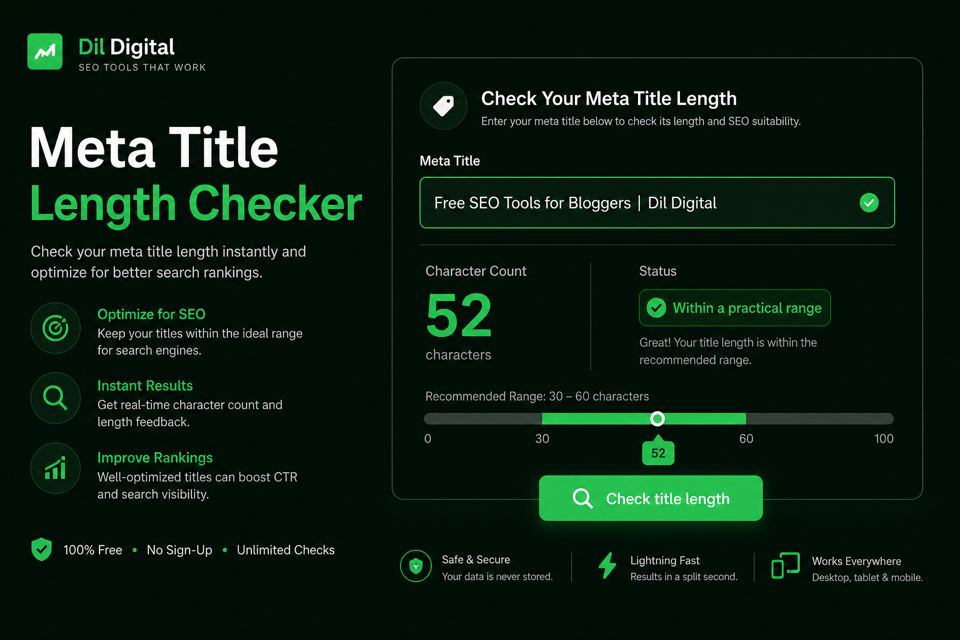
A meta title (also called a title tag) is the HTML <title> text that often becomes the blue link in Google search results.
Length here means display safety in the SERP, not a Google “penalty score.” Titles that run too long get cut with an ellipsis. Titles that stay too short waste the space searchers use to decide what to click.
People also search for this job as a title tag checker, meta title checker, title length checker, or SEO title length checker. The job is the same: validate the string before it goes live.
Google calls the clickable result a title link. It can draw that text from your HTML <title> element, your visible H1, an og:title / Open Graph title, and other on-page signals. A clean, accurate title still gives you the best chance of controlling what people see.
This DilDigital page is for founders, bloggers, SEOs, and students who want a fast, honest check without signup friction. The tool runs locally in your browser so draft titles never need to leave your machine.
Character count is a useful guide. Pixel width is closer to how Google actually truncates titles.
A classic proof: WWW is not the same width as iii. Both are three characters, but wide capitals consume far more horizontal space in a SERP title link. A capital W takes more room than a lowercase i, which is why two titles with the same character count can render differently.
That is why a title tag pixel width check matters alongside a title tag character count. Industry practice treats about 50 to 60 characters, or roughly 580 to 600 pixels on desktop, as a practical safety zone. Google does not publish one permanent magic number, and layouts change, so treat those figures as working guidance rather than law.
This DilDigital tool measures approximate pixel width in the browser with an Arial-based canvas estimate, then pairs it with character count and a practical verdict. That is the common industry method used by many free checkers. It is still an estimate, not a private Google API.
On mobile, Google often wraps title links across more than one line, so a title that barely fits desktop can still display differently on a phone. Front-load the words that must never get cut, then confirm the full result with a SERP title preview when the snippet matters.
| Element | Approx chars | Approx px | Notes |
|---|---|---|---|
| Desktop title link | 50–60 | 580–600 | Common industry safety zone for English titles |
| Too short zone | Under 30 | Varies | Often wastes SERP space and looks incomplete |
| Rising risk zone | 60+ | 600+ | Ellipsis risk rises; wide letters fail sooner |
| Same chars, different width | 3 vs 3 | WWW ≫ iii | Proof that character count alone can mislead |
| Mobile title link | Varies | Wraps often | Do not assume the desktop string is what phones show |
Paste the exact HTML title you plan to use. This title tag length checker counts characters, estimates pixel width, and tells you if the length sits in a practical range for search snippets.
It is built for founders, bloggers, marketers, and students who need to check title tag length quickly without opening a full SEO suite.
Your draft stays in the browser. Nothing is uploaded, and you do not need an account to run the check. Use Compare A/B for two candidates, or Bulk check for a local title sheet.
Enter the exact title string you plan to put in the HTML <title> element. Optionally add a target keyword, brand, and display URL for richer checks.
Hit Check title length (or just type — single mode updates live) to see characters, desktop/mobile pixel meters, and a practical verdict.
Google truncates by pixel width. Titles full of W, M, and other wide letters can cut off earlier than a narrow title with the same character count.
Use the desktop and mobile title-link previews to see where an ellipsis would fall, whether your keyword survives, and whether brand-first placement wastes space.
Compare two candidates, run a local bulk sheet, copy a QA summary for teammates, then front-load the keyword and re-check before you publish.
Write for the searcher first. Keep the Google title length checker mindset: clear, specific, and short enough to display.
Under about 30 characters usually feels thin. Around 50 to 60 characters is the practical zone for most English titles. Past 60 characters, truncation risk rises quickly.
Put the primary keyword near the front. Add the brand at the end with a pipe (|) or dash (-) when space allows. Keep every title unique. Make sure the title and H1 describe the same page intent, even if the wording is not identical.
Google’s title-link guidance asks for descriptive, concise text and warns against keyword stuffing and repeated boilerplate. That is the standard this page follows.
After publish, watch Search Console CTR on important URLs. A title that ranks but earns weak clicks is often too vague, too truncated, or misaligned with the query the page actually wins.
Truncation and rewriting are different problems. Length issues cause cutoffs. Relevance and clarity issues cause rewrites.
Truncation happens when the rendered title is wider than the space Google allocates in the result. You see an ellipsis and lose the ending words.
Rewriting happens when Google decides another source better represents the page for a query. Common triggers include a title that does not match the page, heavy keyword stuffing, boilerplate repeated across many URLs, or a weak title compared with a clearer H1.
You cannot force a title link. You can reduce bad outcomes by keeping length and pixels under control, matching on-page reality, and avoiding spammy patterns. If Google still rewrites a title, improve the page’s clearest visible heading and the promise of the HTML title together.
Compare clean titles with weak ones before you ship: good, too long, too short, and wide-character traps.
Meta Title Length Checker [100% Free] | DilDigital
Title Checker - Check Meta Title - Free SEO Title Length Checker Tool Online
Takeaway: The good title leads with the job, stays compact, and ends with the brand. The bad title stuffs synonyms and burns length with no clearer promise.
Title Tag Length Checker for Google SERPs | DilDigital
Title Checker
Takeaway: The short title wastes SERP space and says almost nothing about the job. The stronger title still fits a practical range while naming the outcome.
10 Proven Tips to Lower Bounce Rate in 2026 | Acme
How to lower your bounce rate on your website in 2026 step by step guide for beginners
Takeaway: The good title is about 51 characters and still specific. The bad title is roughly 83 characters and will usually truncate before the useful ending.
Canonical Tag Generator for Clean URLs | DilDigital
WWW MAXIMUM WARRANTY GUIDE FOR COMMERCIAL MOWER BUYERS 2026
Takeaway: Even at a similar character count, heavy wide capitals can render much wider in pixels. Prefer mixed case and tighter wording.
Use these rules when you check title tag length and rewrite before publish.
Treat under 30 as too thin and over 60 as rising truncation risk. Re-check after every edit.
Use the pixel reading from this tool. Wide letters consume more SERP space than the raw character count suggests.
Put the main topic in the first few words so it survives truncation and stays easy to scan.
Use a pipe or dash before the brand for most independent sites. Let the topic lead.
Every indexable URL needs its own title. Template sameness creates confusion in search results.
They do not need identical wording, but they should describe the same page. Mismatches invite Google title-link rewrites.
Repeating the same phrase looks spammy to people and to Google. Write one natural title.
Long repeated suffixes on every page waste space and weaken uniqueness.
Ask whether the first half of the title still makes sense if the ending disappears on a smaller result.
Title length is one publish gate. Confirm the meta description and full snippet before you ship.
Search is not the only place your title shows up.
When AI systems cite a web page, they often surface the page title next to the URL. A clear title helps humans in Google and helps machines label your page when they reference it.
That is not an excuse for stuffing, and it is not a secret “AI ranking factor.” Short, accurate, human titles travel better across classic search and AI answers alike.
Most weak titles fail for ordinary reasons, not exotic algorithm myths.
Duplicate titles across many pages make results hard to tell apart. Brand-first CMS defaults bury the topic. All-caps titles look noisy and burn pixel width. Clickbait that does not match the page invites rewrites and bounce-backs.
Emoji can work in a few consumer niches and fail in most professional ones. Outdated years, filler phrases, and synonym stuffing also burn budget you could spend on meaning. If two pages need the same topic word, differentiate the rest of the title so searchers can tell them apart.
Run these checks after the length tool returns a verdict.
Straight answers for title tags, truncation, and Google title links.
For most English pages, aim for about 50 to 60 characters. That range usually stays readable in desktop results. Under 30 often feels incomplete. Past 60, truncation risk rises. Google does not publish one fixed character law, so treat the range as practical display guidance.
Google truncates title links to fit the result layout. In practice that behaves like a pixel-width limit, not a pure character counter. Wide letters take more space than narrow ones, which is why two 55-character titles can display differently.
Google does not publish a permanent pixel law. Industry checkers commonly use about 580 to 600 pixels on desktop as a safety zone. This tool estimates width with an Arial-based browser measurement so you can catch titles that are wide even when the character count looks fine.
The rendered title is wider than the space Google allocated for that result. You will see an ellipsis and lose ending words. Shorten the title, move important words forward, and reduce wide-character density.
Google may replace your HTML title with other on-page text when it thinks another wording better matches the query or the page. Common triggers include weak or stuffed titles, boilerplate patterns, and titles that disagree with the visible H1 or page content.
You cannot force a title link, but you can make rewrites less likely. Keep the title descriptive and concise, align it with the H1 and page promise, avoid stuffing, and drop boilerplate repeated across many URLs.
Use about 50 to 60 characters as a practical SEO title length. Pair that with a desktop pixel check near 580 to 600px. The goal is a clear title link, not hitting a mythical ranking score.
Under about 30 characters usually feels incomplete and wastes SERP space. If a title is that short, add the specific outcome, topic qualifier, or brand so searchers know what the page offers.
They should describe the same page intent. They do not need identical wording. The title has a tight SERP budget. The H1 can be longer and more editorial. Large mismatches make rewrites more likely.
Put the primary keyword near the beginning. Front-loading protects the topic if Google truncates the ending and makes the result easier to scan. Avoid repeating the same phrase.
In everyday SEO language they usually mean the same thing: the HTML <title> text. “Meta title” is industry shorthand. Google’s docs often say title link for the clickable result that may come from your title or other on-page sources.
For most smaller brands, put the topic first and the brand last after a pipe or dash. Well-known brands sometimes lead with the brand. If space is tight, protect the topic words first.
A title helps Google and users understand the page, but length itself is not a ranking penalty. The bigger issue is click-through: truncated or vague titles get fewer clicks. Write for clarity and display safety.
It can still rank. Truncation is a display issue more than an automatic ranking penalty. The cost is usually clarity and CTR, because searchers never see the ending words you thought were carrying the offer.
Mobile layouts differ and often wrap title links. Do not assume desktop and mobile show the same visible string. Front-load the words that must appear on every device.
Sometimes, in casual consumer niches. For most professional and B2B pages they look noisy, can waste pixel width, and may render inconsistently. Prefer clear words unless you have proof the emoji helps clicks.
CMS templates, reused blog defaults, pagination, and copy-paste publishing often create the same title on many URLs. Searchers then cannot tell results apart. Give every indexable page a unique title that names its specific topic.
Paste your draft into this free meta title length checker, run the check, and revise until the character count and pixel width sit in a practical range. No signup is required, and the draft stays in your browser.
Audit when you publish, after major content changes, and when Search Console shows weak CTR on important URLs. A light quarterly pass across top landing pages catches duplicates and outdated titles.
Paste a draft, read the character and pixel verdict, then tighten until the title link stays clear.